I needed a mobile development station in case I needed to jump into code along with my other engineers. I’ve always preferred creating software on a machine with a large keyboard, a full sized mouse and a large screen. However, at present, I need mobility. My laptop is a 2008 Aluminum Core2Due MacBook and for the most part it’s quite quick. For development, I loaded Windows 7 professional on it via BootCamp but noticed really poor battery life (40% of Mac OS). Sadly, Apple doesn’t ship decent Windows 7 drivers given the age of my laptop. Newer Macbook Pros/Airs don’t have this issue with Windows 7. But if I buy a new machine right now, I’ll need 8 GB RAM to run both OSs in parallel. And I don’t want to spend $2700 on a Macbook Pro while constantly resenting it’s large size. Nor do I want to settle for a MacBook Air with just 4 GB RAM (Apple’s top limit right now).
Since battery life in native Windows 7 mode (bootcamp) was so poor, I thought I’d try running Windows 7 inside a Mac OS virtual machine. Mac OS’s drivers are very well tuned, so battery life should be nice. Not as good as Mac OS X only, because the Windows virtual machine adds additional load on the processor (=> more electricity => lesser battery life).
So, what’s the problem?
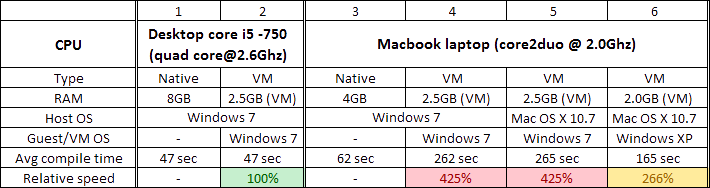
When I tried that, I noticed a massive slow down in the virtualized Windows 7 running on the laptop. Take a look at the numbers below, the same operations take about 4.25 x longer !!

This was mind boggling since I knew even the humble Core2Duo had some hardware support for virtualization. I tried the same virtual machine on my desktop and there I was getting near native performance.
It was admittedly a lot better than I was expecting but I won’t complain.
And what might cause that problem?
OS : I tried both Windows 7 (VM) on top of Windows 7 native AND Windows 7 (VM) on top of Mac OS X 10.7 (native). Columns 4 and 5. No difference. So hosting OS isn’t an issue. Thankfully.
RAM: Then I started suspecting 4 GB RAM on the laptop may be tight for both Mac OS X 10.7.2 + Windows 7 VM, so I fired up an older WinXP VM I had and installed Visual Studio 2010 there and tried it again. Although it’s still not near-native speeds, the WinXP VM is a lot more acceptable at about 2.66 x of the native speed (of 1.66x or 166% extra time than usual). But on the flip side, even after taking RAM out of the equation, there is STILL a LOT of performance degradation on the Core2Duo’s virtual machine performance. There is something else …
CPU: The only major thing that’s left out is the CPU. Of course, the core i-5 and the Core2Duo CPUs are different. But we’re comparing processor “X” native performance vs processor “X” virtualized performance. So the experiment should be self-controlled to a large extent.We need to look closer and do so via a neat tool, CPU-z. I’ve put screens below.
However, So unfortunately, it’s not clear why virtualized performance is SO radically different between the near-native performance of the core i-5 versus the 266% slowdown on the core2duo. A dump of CPU-Z info shows that the CPU extensions are similar meaning they should have the same level of hardware virtualization support.
The faster RAM bandwidth and the larger cache on the desktop Core-i5 could really outpace the laptop Core2Duo. So even when the virtual machine gets the same quantity of ram, it’s not the same quality. The desktop RAM has much higher bandwidth, so it’s can push/pull data from the RAM to the CPU much quicker. This means the CPU is NOT starving for data as compared to the laptop. On top of that the cache on the desktop Core-i5 is way larger (8 MB L3 Cache!).
Conclusion?
For the time being I’ll stick to Mac OS X for email, office docs, presentations and spreadsheets. When I need some development AND I’m on the road, I’ll fire up Windows XP and work in it. Same for QuickBooks if I need to catchup with accounting – that’s Windows only too. When Apple starts making 8 GB MacBook Airs, I might upgrade.
For the curious, the software test was basically compiling a Visual studio 2010 solution which contained 3 projects
- 1x DLL library
- 2x ASP.NET 4.0 websites